Thứ Ba, 31 tháng 3, 2009

Toucan 2.0.6

Toucan is a small utility lets you synchronize, backup and encryption of data with many functions and options over the package professional. The main functions of the software may be included such as:

- 4 modes synchronize, copy, update, backup and standardized data.
- Backup and restore support compressed zip, 7-zip support back up all or only backup the changes, as well as restore files from the compressed file.

- Data encryption algorithms with AES-256.
- Supports running from the command line, allowing to create batch file to perform a task automatically and regularly.

Special programs for free and run in portable mode, you can go anywhere in the memory card of your USB.

Thứ Bảy, 28 tháng 3, 2009

Folder Encryption 5.36

Folder Encryption is easy to use in encryption and data protection. Users can encrypt or code any folder on any computer, including USB drives or mobile hard disk. You can code the encryption was easily just as if you compressed them. After the folder has been compressed, others will not have a way to delete, copy or view the content of files inside it. And a more convenient, you can encrypt a folder in this computer, which then opens in a computer for any use.


Thứ Ba, 24 tháng 3, 2009

Mil Shield 6.8

After a movie, a photo, a document or visit a website, your computer will remember about them. Ask if your placement, wife (husband) of your children, your colleagues know everything you do. Mil Shield will remove any vestige of your computer. With the program you can open the browser, work or leisure without your interest or concerns.

Book Writer 5.1

Book Writer is not more powerful features such as text editor Microsoft Word famous but it is quite full of features needed to edit and create a book. Thanks to the ability to manage the project which strongly Book Writer is used as a professional editor to editor of many books sections, chapters and sections. You can manage, search, edit the content throughout the last chapter, entries in your project is easy and convenient.

Disk Password Protection


Disk Password Protection

Introduction
The hard disk space large current partition is to contain data. You can use the "Disk Password Protection" to hide the partition hard drive that you use to store the sensitive data.

Pasword Protection Disk can hide the entire partition containing all data on your hard disk in a very safe and works even with all types of USB memory card is attached to the computer. If you are a careful user can apply immediately to the DPP boot partition to C one can not boot the computer if no appropriate password.
Technical guidelines
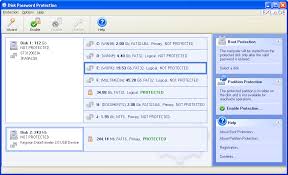
The use of the DPP also very easy on the friendly interface. Here's how:

1. Lock all the sub-region as well as any USB memory card is attached to the computer: You only need to click to choose the partition memory card or extra USB DPP has been listed -> click the Enable button Partition table appear Protection -> enter password to use to enter the password box and Confirm the password. If you are a forgetful type you can recommend me to remember password in the Password hint -> click OK to complete.

2. Lock your boot partition: often used to partition C and slightly more than a little Khe. Click Wizard -> Check Boot Protection in selecting just the Protection Mode and click Next -> Select the hard drives you in selecting Disk and click Next to appear when entering the Password and hint -- > enter the password used to enter the password box and Confirm the password -> finally click Start button to complete.

After completing the above, DPP will ask you to enter the password at the appropriate stage to boot DOS computer can log in to the Windows boot.
http://www.exlade.com/download/dppsetup.zip

History Kill 2006


History Kill 2006
After all web surfing, chatting or xài applications ... you will leave a lot to mark others can learn about web surfing habits or the work you are doing. Use the "History Kill", the software has been awarded CNN room named "Top Internet Privacy Tool" to clean the stamp.

Once installed and activated successfully, History Kill (HK) will be the symbol of it is in the tray clock. You simply click on this icon is the will of KL up to you to use very easily. Features of the HK is more of the tags on separate interface, you simply select the index mark to delete and click the button "Kill Now" to KL to clean for you. Here are some of the HK:

1. Internet Explorer: Support delete all entire mark in Internet Explorer include the URL address box, the History file, the file in the Temp storage, index.dat files, Google's History, History of the search Search Plug-in type, Cookie ... As in the feature also has management application named Cookie "Cookie Manager". Click "Cookie Manager" up to the cookie management. HK will list for you all the cookies on entry. You can keep or delete the cookies in with the 2 button functions as "Keep cookies" and "Remove Cookie".

2. Firefox: Support delete mark similar to Internet Explorer.

3. AOL: Support delete mark similar to Internet Explorer, Firefox.

4. Windows: Support delete the mark stored in Windows such as Windows Media Player, Recycle Bin, the file list just open Windows and Microsoft Office, the temporary storage Temp, Windows Start ...

5. Auto-Kill: This feature will automatically delete giùm you everything that you have selected in 4 card presented above. You only need to mark the 2 boxes as "Auto-Kill on Windows Startup", "Auto-Kill on Last Close Browser Windows" HK to automatically delete everything to you as soon as Windows has finished booting, or when closing the of any browser.

6. File Shredder: This feature is deleted file stamp unique style overwritten many times that almost can not restore it. You can choose to override the number to remove from 1 to 99 times in the box "Overwrite your Internet trace times, but the number of override default is 7, was also too much.

HK also equip your hot key combination Ctrl + Alt + Space Bar so you can delete any mark any time you like. Through comparison tools with the same function, we found that the level of fast and convenience of HK always stand on a row.

http://www.trustsoft.com/download/HistoryKill2006.exe

All in One


Introduction

Can do work environment is too sensitive, or just simply want to hide your screen (desktop) immediately when someone came, and the protection of important data from the intervention of other people use general computer.

Working with multiple monitors

With the Virtual Desktop, All in One for a solution to many display or hide the Desktop continuous time a group of windows.

To use the Virtual Desktop, you just check the box "Enable Virtual Desktop" in the Virtual Desktop. Four small window showing the right bottom of the symbol for the four screen Desktop. To use any screen, you simply click on the screen is finished. You can change between the screen with a fast speed, that is can also do a lot of comfort that no one knows fear.

Data encryption
Data assets is a very precious and private. If you are not interested in anyone who can interfere in it when sitting before your computer. So why do not you try to use the Encryption for "concept" of encryption is how. The simplest way is to try a text file. Encoding method by All in One is TwoFish algorithm, 256 bit, 16 rounds rotatory.

To use logic simple: encryption / code by any file, the password what encryption is. You only need to complete in the right window of Encryption function is finished. Click Start to execute.

Delete "clean" a folder

The documents are removed when the Shred File / Folder method is invaluable for recovery. This is a tool or when you need to remove the stain and will be damaging when you miss a hand with a file or folder is important. So please carefully. Method used is quite simple, just select the file or folder to delete "permanent", click the button next to Shred is finished. Shred will override the file is deleted as many times as you depend on.

Clean stamp of AutoCompleted

Function is AutoCompleted remember username and password when you log on to any website yet. This is a very convenient feature for many computer users, but it is the double-edged. If you go away from a first time, and someone sitting on it as you that everything in your computer are of them.

Function recover Web Password allows you to manage the parameters. Can delete or archive if you want.

Remove all stamp when using the

When you use the computer often leave a lot of that mark if the comments, people will recognize the file name in the list of files recently used when using the Media, Word Processor, files. Tmp, cache ... Internet Privacy feature - Cleaning up your track will help you "really clean" to yourself and others.

To use, simply select the list of file search and need to delete, click Start to find and execute.

Or more carefully, you can use the Management / Enhancement to prohibit the re-mark to a lot of Windows programs.

And finally, you should always hide the window all in one, prevent the removal of all in one process using Task Manager or removed completely from the computer, the General Settings tab. Even you have removed all in one from the list of software installed, Uninstall list, the software automatically boot when you turn on machine.